
Someone sends you a three-minute voice message, and you are on a bus, in a meeting or somewhere quiet. You want to read it, not play it. This guide covers every way to transcribe Telegram voice messages to text: the button built into Telegram Premium, the free tries Telegram gives everyone else, and bots that do it for free in any chat.
One of the bots below, Transcriber, is made by the team behind miniapps.me, so read this knowing we have an interest in it. We have tried to be as plain about what it can't do as about what it can.
The quick answer
| Way | Cost | Best for |
|---|---|---|
| Telegram's own button | Included in Premium, a few free tries a week without it | Reading voice messages in the chat where they arrive |
| Transcriber | Free, no sign up | Long voice messages, audio files and videos, with a .txt file |
| Voicy | A one-time donation per chat | Groups where every voice note should become text |
How to transcribe voice messages with Telegram Premium
Voice-to-text is one of the features Telegram lists for Premium, along with transcription of round video messages. It works in the chat itself, so there is nothing to forward.
- Open the chat with the voice message.
- Tap the small button on the right of the voice message, the one with an arrow and the letter A.
- The text appears under the message. Tap the button again to hide it.
You can subscribe to Premium through the App Store, Google Play or Telegram's own Premium Bot. Telegram's FAQ says the bot is cheaper because Apple and Google don't take a cut of the payment. Our guide to buying Premium cheaper compares the prices, including paying in crypto.
Can you transcribe without Premium?
Yes, a little. Telegram gives accounts without Premium a small number of free transcriptions each week, and each one has a maximum length. Telegram's developer documentation describes both limits as settings on its side, so the exact numbers can change, and the app tells you how many tries you have left.
There is one more free route. When a group is boosted to a high enough level, every member can transcribe any voice message in that group without using up their weekly tries. In Telegram's current table, unlimited voice-to-text for a group starts at level 6. Boosts come from members with Premium, so this depends on the group, not on you.
For everything else, a bot is the free option.
Transcribe Telegram voice messages with a bot
A transcription bot is a normal Telegram bot that listens to audio and replies with text. You forward the voice message to it, wait a few seconds, and read the answer. It works on any account, on any device that runs Telegram.
Transcriber: free, for any voice message, audio or video
Transcriber is at @TranscriberAppBot. It turns voice messages, audio files, videos and round video messages into text with punctuation and capitals, split into paragraphs. It detects the language for you, from more than 30.
- Open @TranscriberAppBot and press Start. There is no sign up. It uses your Telegram account.
- Forward the voice message to it, or send an audio file or a video.
- The text arrives in the chat in seconds, with a .txt file of the same transcript.
This is roughly what the reply looks like. It is a simplified example, not a real chat.
Voice message, 0:38
Hey, quick update on the launch. The landing page is done and we go live on Monday at 9. Can you send me the final copy by Friday?
transcript.txt
The bot takes recordings up to 30 minutes long. For a bigger file, the same tool runs on the web at transcribe.miniapps.me, which accepts MP4, MOV, MP3, WAV, M4A, OGG, OPUS and more, up to 500 MB and 15 minutes per file. Telegram voice notes are OGG or OPUS files, so a voice message you saved to your computer works there too.
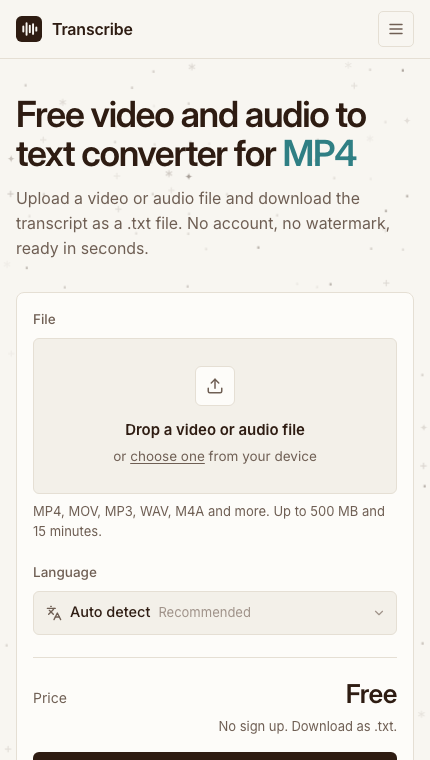
The web version takes files up to 500 MB and 15 minutes, free.
Voicy: built for groups
Voicy is an independent, open source bot at @voicybot. Telegram shows it with about 14,700 monthly users at the time of writing. Its strength is groups: add it to a group and it can reply to every voice message with its text, so nobody has to press play.
In a group, /transcribe_all switches between transcribing every voice message and only the ones someone replies to with /transcribe. /silent hides its status messages so only the text is posted. It also takes audio files in .ogg, .flac, .wav and .mp3 up to 100 MB, once someone sends /files in that chat.
The catch is the cost. Voicy's site says speech recognition takes GPU time, so each chat has to be activated once with a donation, in Telegram Stars or by card, by sending /donate in that chat. A group needs its own activation.
Which one to use
- You already have Premium. Use the button. It is the fastest and the audio never leaves Telegram.
- You don't have Premium and need a voice message now. Use your free tries, or forward it to Transcriber.
- The recording is long, or it is a video or a file. Use Transcriber in Telegram, or the website for files above the bot's limit.
- You run a group full of voice notes. Voicy, or boost the group to the level that unlocks voice-to-text for everyone.
Tips for a cleaner transcript
- Background noise costs more accuracy than anything else. Music, traffic and echo all make words harder to hear.
- People talking over each other come out jumbled in every tool.
- Names, brands and numbers are the words most often misheard. Check them before you quote anything.
- Mixed languages confuse automatic detection. If a recording switches language, choose the language yourself on the website.
What these tools don't do
No transcription is perfect, and none of these tools tells you which words it was unsure about. If the exact wording matters, for a quote, a contract or anything legal, listen to the recording as well.
They write down what was said in the language it was said in. Transcriber and Voicy don't translate. To read a voice message in another language, transcribe it first and then use Telegram's translate option on the text.
Transcriber makes plain transcripts, not captions with timestamps, and it does not name who is speaking. Telegram's button only works inside Telegram, on the message itself, and won't give you a file.
A bot also has to receive the recording to transcribe it. Telegram's own button keeps the audio with Telegram. A bot means sharing the audio with whoever runs that bot. Transcriber says it deletes files once the transcript is ready and doesn't use them to train models, but the same question applies to any bot you try: don't forward a voice message you wouldn't want someone else to hear.
The short version
With Premium, tap the button on the voice message. Without it, use your few free tries a week, or forward the message to Transcriber for a free transcript and a .txt file. For a busy group, Voicy answers every voice note once the chat is activated.